Stop Retyping Invoice Data from PDFs
If you do the books — for yourself or for clients — you spend a real part of your week moving the same four things off invoices: the amount, the date, the invoice number and the IBAN. Half the invoices are image PDFs you can't select, so you retype them, and on an IBAN or a total one wrong digit is a real problem. Here's how to do it faster and safer.
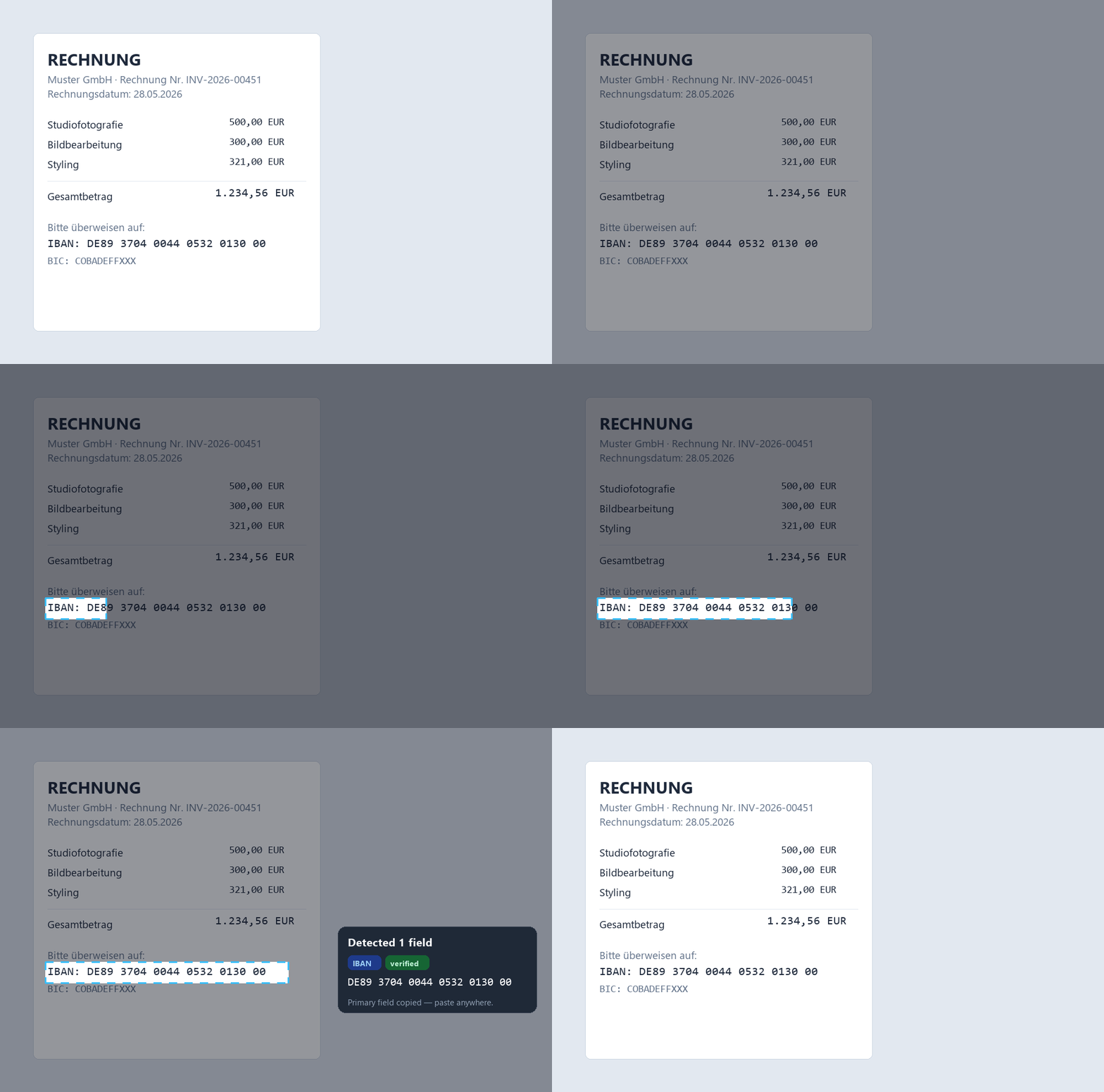
Snip2Field is a Windows app for copying invoice data without retyping: hotkey, drag a box over the amount, date, invoice number or IBAN, and it OCRs and copies it — validating IBAN checksums and running fully offline.
Why is invoice data so annoying to copy?
Two reasons. First, many invoices are scanned or exported as images, so the text won't select and you're stuck retyping. Second, the fields you need are scattered across the page in different formats. Retyping is slow, and it's exactly where transposed digits creep in — the kind that bounce a payment or throw off a reconciliation.
High volume — a data-extraction service
If you process hundreds of invoices, dedicated capture tools (Docparser, Rossum, your accounting suite's built-in capture) pull every field automatically. Powerful, but there's setup, a monthly cost, and usually an upload step — worth it at volume, heavy for a freelancer doing a few dozen a month.
Selectable PDFs — just copy
When the invoice is a real text PDF, select and copy normally, or use your accounting software's import. Simple — until you hit the scanned ones, which is where it falls apart and the retyping starts.
Ad-hoc, any invoice — snip each field
For a realistic mixed pile of invoices, the fastest thing is to grab fields as you go. Snip2Field lets you hotkey, drag a box over the amount or IBAN, and it's copied — works on scanned and text PDFs alike because it reads the screen. See the focused guide on copying an IBAN from a PDF.
- Press the hotkey over the open invoice (Ctrl+Shift+P).
- Drag a box over the amount, date, invoice number or IBAN.
- It detects the field and copies it — paste straight into your software.
| Approach | Best for | Setup | Catches a wrong digit |
|---|---|---|---|
| Data-extraction service | Hundreds of invoices/month | High | Varies |
| Copy from a text PDF | Selectable PDFs only | None | ✗ |
| Snip each field (Snip2Field) | Mixed / ad-hoc piles | None | ✓ IBAN checksum |
Related: extract text from a scanned PDF · copy text from a screenshot.
Stop retyping the same four fields
Snip amounts, dates, invoice numbers and IBANs straight off your invoices — checksum-verified, fully offline.
Try Snip2Field free7-day free trial · $14 once · Windows
FAQ
- What's the fastest way to copy data from an invoice PDF?
- For occasional/mixed invoices, a region-OCR tool: hotkey, drag a box over the field, paste. For hundreds a month, a dedicated capture service that reads every field automatically.
- How do I avoid typos when entering IBANs and amounts?
- Don't retype them — OCR the field and, for IBANs, use a tool that validates the checksum. Snip2Field flags any IBAN it can't verify.
- Is it safe to copy client invoice data with these tools?
- Use an offline tool. Snip2Field does everything locally, so client bank details aren't uploaded anywhere.
- Does it work for amounts and dates too, not just IBANs?
- Yes — it recognises amounts, dates and invoice numbers as well as IBANs, and will copy any text region you draw.